 Login
Login
Librera PRO Book Reader is one of the most powerful and flexible reading apps available for Android users. It is built for people who read a lot of books, documents, manuals, study files, and comics on their phones or tablets. The app supports almost every popular ebook and document format, making it a complete all in one reader.
Introduction
Many users search for Librera PRO Book Reader because they want a clean reading app with full control over fonts, layout, scrolling, and reading tools. This article explains what Librera PRO is, what it can do, who it is for, and why it is trusted by many readers around the world.
What Is Librera PRO Book Reader
Librera PRO is the paid version of Librera Reader. It is designed for smooth, distraction free reading with advanced customization. The app supports ebooks, PDFs, documents, archives, and even comic formats.
It works fully offline, which makes it perfect for students, professionals, travelers, and book lovers who want access to their library anytime.
Formerly known as Lirbi Reader and PDF Reader PRO, Librera has grown into a feature rich reading platform.
Supported Book and Document Formats
One of the biggest strengths of Librera PRO is format support. You do not need multiple apps for different file types.
Librera PRO supports:
- EPUB and EPUB3
- MOBI
- FB2 and FB2.zip
- DJVU
- DOC and DOCX
- TXT and RTF
- AZW and AZW3
- CBR and CBZ comic files
- HTML, XPS, MHT
- ZIP archived books
This makes it one of the best ebook readers for Android when it comes to compatibility.
Simple and Clean User Interface
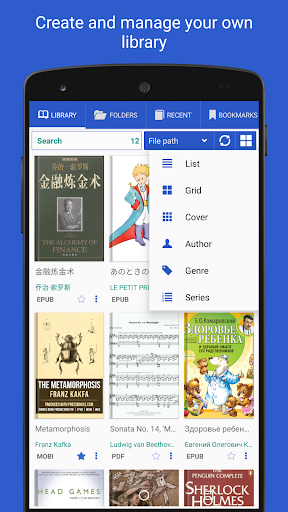
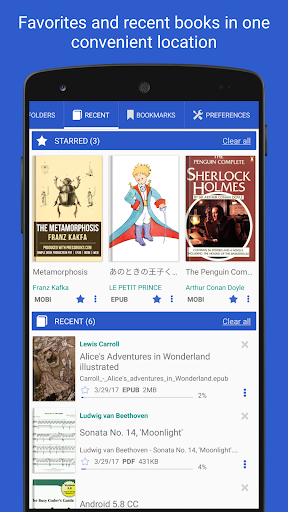
Librera PRO uses a simple layout that focuses on reading comfort. The interface is clean and easy to understand, even for new users.
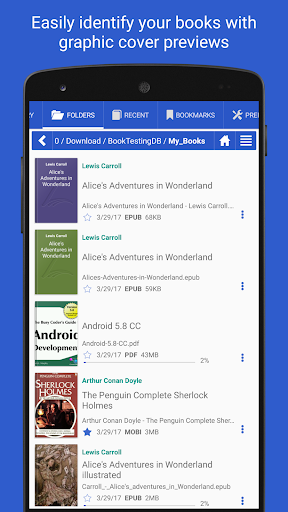
Books are shown with:
- Cover thumbnails
- File details
- Reading progress bars
- Clear file names
You can switch between list view and grid view based on your preference.
Smart Library Management
Librera PRO helps you organize your books automatically.
You can:
- Auto scan selected folders
- Browse folders with built in file explorer
- Create Favorites and Recent lists
- Filter books by name, size, date, or path
- Group books using custom tags
Once set up, the library updates itself without manual work.
Reading Modes for Comfort
The app is built to reduce eye strain and improve focus.
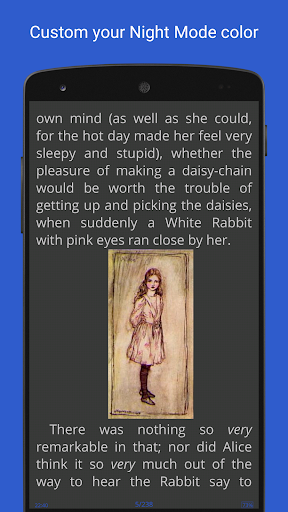
Day and Night Modes
You can set separate settings for day and night reading. This includes:
- Background color
- Text color
- Brightness
- Contrast
Night mode is very helpful for reading in low light.
Vertical and Page Scrolling
Librera PRO allows:
- Vertical scrolling
- Page by page reading
- Screen by screen flipping
- Vertical scroll lock
This is useful for PDFs and long documents.
PDF Reading Features
PDF support in Librera PRO is strong and reliable.
You can:
- Reflow text for easier reading
- Zoom and auto center pages
- Lock vertical scrolling
- View dual page documents as single pages
- Add bookmarks and notes
These features make it suitable for textbooks and manuals.
Bookmarking and Annotations
Librera PRO supports both fixed and movable bookmarks.
You can:
- Mark important pages
- Add notes
- Highlight sections
- Return to exact reading position
This is helpful for students and researchers.
Text to Speech and Read Aloud Mode
One of the most useful features is read aloud support.
Librera PRO works with installed TTS engines and allows:
- Full document reading
- Adjustable reading speed
- Advanced reading rules
- Background playback
You can listen to books while walking or resting.
Musician Mode and Auto Scrolling
Librera PRO includes a unique Musician mode.
This mode allows:
- Hands free reading
- Auto scrolling at a set speed
- Smooth page movement
It is useful for sheet music, scripts, and presentations.
RSVP Speed Reading Mode
RSVP reading mode displays words one at a time on the screen.
This helps:
- Improve reading speed
- Increase focus
- Reduce eye movement
It is optional and fully adjustable.
Translation and Dictionary Support
Librera PRO supports language tools for learners.
You can:
- Translate selected text
- Use online translators
- Integrate offline dictionaries
- Search word meanings instantly
It supports right to left languages like Arabic, Hebrew, and Persian.
Search and Navigation Tools
The app offers fast and accurate search.
You can:
- Search within a book
- Search across multiple books
- Search for multiple words
- Jump to results instantly
This is very useful for study and research work.
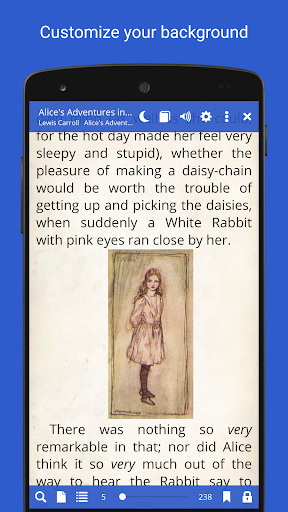
Customization Options
Librera PRO gives full control over appearance.
You can customize:
- Fonts and font size
- Line spacing
- Margins
- Background textures
- Foreground colors
- Custom CSS for advanced styling
This level of control is rare in reading apps.
Sync Across Devices
Librera PRO supports syncing.
You can sync:
- Reading progress
- App settings
- Book positions
This allows smooth reading across phones and tablets.
Offline Reading Experience
Librera PRO works fully offline once books are added.
This means:
- No internet needed to read
- No ads in PRO version
- Perfect for travel and study
Offline support makes it reliable and private.
Performance and Stability
The app runs smoothly even with large files.
It:
- Opens big PDFs fast
- Handles large libraries well
- Uses low battery
- Works on low and mid range devices
It is stable and rarely crashes.
Who Should Use Librera PRO
Librera PRO is ideal for:
- Ebook readers
- Students and teachers
- Researchers
- PDF heavy users
- Comic readers
- Language learners
- Offline readers
It suits both casual and professional users.
Free Version vs PRO Version
The free version includes ads and limited features.
PRO version offers:
- No ads
- Full customization
- Advanced reading tools
- Better performance
Upgrading supports development and unlocks full power.
Final Thoughts
Librera PRO Book Reader is one of the most complete reading apps for Android. It supports almost every file format, offers deep customization, and works perfectly offline. From simple novels to complex PDFs, it handles everything smoothly.
If you want one reliable app for all your books and documents, Librera PRO is a strong choice. It focuses on comfort, control, and flexibility, making reading easier and more enjoyable every day.
For anyone serious about digital reading, Librera PRO is worth using and exploring further.

Additional Information
- Version 9.2.20
- Size 31 MB
- Requires Android 7.0
- Update Dec 29, 2025
- Developed by Librera
- Category Apps
- Package Name com.foobnix.pro.pdf.reader
Advertisement
Whats news
Read books easily
EPUB, PDF and Comics
Update PDF engine